Event Module

Easily manage parking at all your events using the Event Module

Streamline Event Parking from Ticket to Car Park

MyCarPass's Event module transforms how you manage parking for concerts, sporting events, festivals, and conferences. Seamlessly integrate with ticketing platforms, automatically process parking orders, and deliver a premium customer experience.

From the moment someone purchases a ticket with parking through to their arrival at the venue, our Event module handles everything automatically—order imports, vehicle registration collection, parking permit generation, whitelist management, and customer communications.

Ticketing Integration CSV Import Auto Emails Vehicle Registration QR Codes Hanger Cards Whitelist Sync Directions PDFs Ecommerce shop

Key Capabilities

Everything you need to manage your Event efficiently

Parking Permits

Issue a parking permit based of a successful sale on your Ecommerce website, or pay for a parking add-hoc

Hanger Cards

You can issue either a digital or a physical hanger card to vehicles at your event.

Partner Management

Give access to your partners to manage their own hanger cards, to upload their own Vehicle using the friendly partner dashboard

User Orders

Mange all your orders. View and list imported orders or orders with different statuses.

API Import

Customizable API groups & fields enable you to import from any ecommerce or event ticketing system.

Onsite Kiosk

Allow your customers to purchase parking onsite using our touchscreen system. Pay using Credit/Debit/Google or Android Wallet.

Design Builder

We can design your unique URL to make it look and feel like its apart of your exiting website.

Online Shop

Sell event tickets and car parking passes on your own online ecommerce shop.

Product Configuration

Set up parking products with ticket quantity restrictions, multiple car park options, directional documents, and automated approval workflows for streamlined processing.

Advanced Technical Features include:

  • Custom API fields and groups: import orders from any event or ecommerce based system and test your JSON script.
  • Stripe Payments: Using stripe checkout process ensures that the customer checkout process is secure and complies with trading standards.
  • Kiosk: Take payments securely using the onsite kiosk hardware and touchscreen software.
  • Customer Login: Customers can login securely and view their orders to any event as well as view the vehicles assigned to permits.
  • Manage Products: Setup Products against your event, whether they are parking or ticket products.
99.8%

Uptime

24/7

Monitoring

<2min

Issue Detection

1000+

Cameras Managed

Ready to start using MyCarPass Event Module?

Discover how the Event Module can manage your events and save you money and time

The Complete Customer Journey

From ticket purchase to car park arrival, MyCarPass delivers a seamless experience that delights customers and reduces your workload.

  • Step 1 - Purchase: Customer buys ticket with parking through your ticketing platform (Secutix, Eventbrite, etc.)
  • Step 2 - Order Import: Order automatically imported to MyCarPass via API webhook or manual CSV upload
  • Step 3 - Email Invite: Customer receives branded email inviting them to register vehicle(s) for parking
  • Step 4 - Registration: Customer enters VRM(s) via personalized portal, selecting car parks and dates as needed
  • Step 5 - Confirmation: Automated email with parking permits, QR codes, and directional PDFs for each car park
  • Step 6 - Whitelist Sync: Vehicles automatically added to ANPR camera whitelist for seamless barrier access
  • Step 7 - Event Day: Customer arrives, barriers open automatically via ANPR recognition—no staff intervention needed
  • Step 8 - Updates: Customers can change vehicles anytime before event using secure update link in confirmation email
100%

Automated Process

Events Per Year

Real-time

Whitelist Sync

Zero

Manual Entry

Advanced Event Management Tools

Powerful features for complex event scenarios and high-volume operations.

  • Parking Ticket Restrictions: Automatically allocate parking spaces based on ticket quantity—2 spaces for 4 tickets, 3 for 6-8 tickets, etc.
  • Multiple Car Parks: Let customers choose from multiple car park locations based on ticket type and proximity preferences
  • Directional Documents: Attach location-specific PDF directions that auto-match customer selection (M1, M40, etc.)
  • Park & Ride Integration: Dedicated P&R car parks with shuttle bus info and automated routing based on item codes
  • Order Reset & Cancellation: Reset incomplete orders to allow re-registration or cancel entirely with whitelist cleanup
  • Batch Email Resend: Re-send registration invites to specific date ranges or order number ranges for follow-up campaigns
  • CSV Whitelist Upload: Bulk add staff, contractors, VIPs, or media vehicles via CSV for events requiring pre-authorized access
  • 2FA Partner Access: Secure partner portals with two-factor authentication for external stakeholders managing hangers
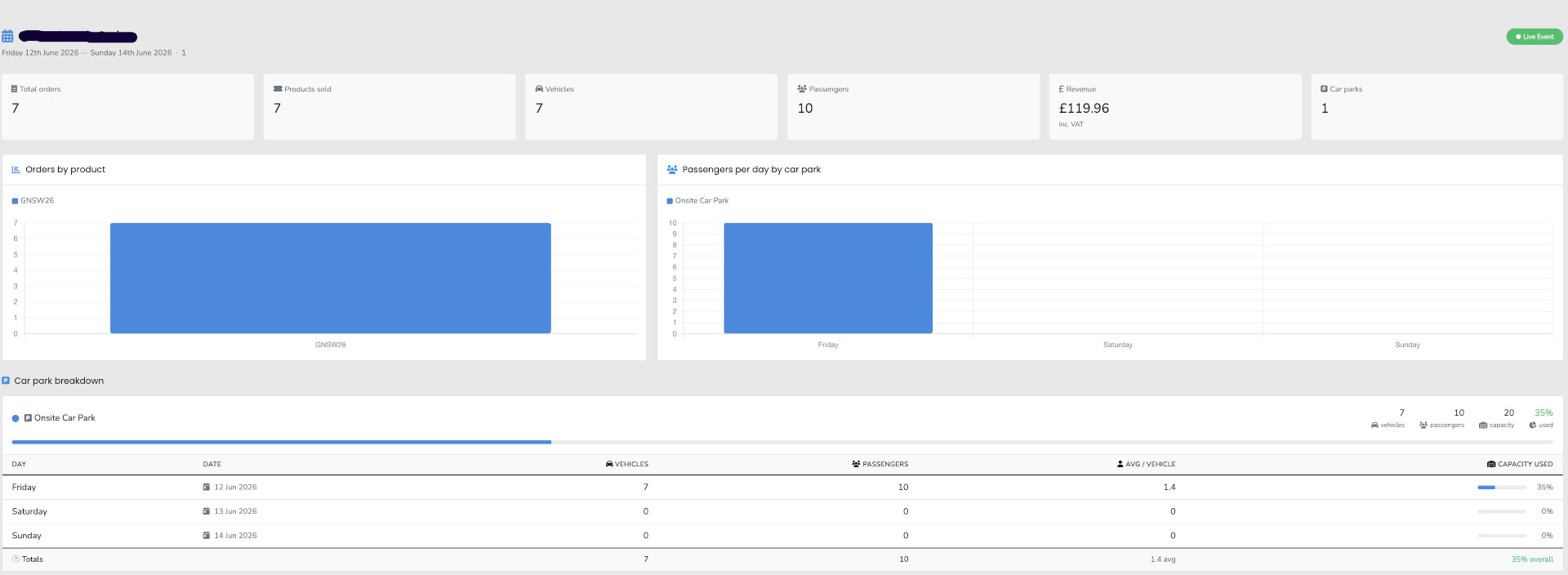
Event Module Dashboard

Integrated Ecommerce Shop

Sell event tickets and parking products directly through your own branded online shop—no third-party ticketing fees required.

  • White-Label Storefront: Your own branded ecommerce shop with custom domain, colors, and event branding
  • Product Categories: Organize tickets, parking passes, VIP packages, and merchandise into logical categories
  • DVLA Vehicle Verification: Real-time vehicle lookup validates UK registration numbers before checkout
  • Smart Cart System: Customers add products to cart, then verify and attach vehicles to parking products during checkout
  • Automatic Invoicing: System emails invoice immediately upon order completion with payment confirmation
  • Event Confirmation Emails: Separate email with event details, parking permits, car park locations, and directional PDFs

Checkout Process

1
Browse & Select

Customer browses categories and adds tickets/parking to cart

2
Vehicle Verification

For parking products, enter VRM for DVLA validation check

3
Attach Vehicle to Product

If verified, vehicle details added to parking product in cart

4
Complete Purchase

Customer proceeds to checkout and completes payment

5
Automated Emails

Invoice + event confirmation with parking permits sent automatically

DVLA Vehicle Verification

Prevent fraudulent registrations with real-time DVLA database validation

Real-Time Validation

Every vehicle registration is checked against the UK DVLA database before being accepted. Invalid or non-existent registrations are rejected instantly with clear error messages.

Fraud Prevention

Stop customers from using fake registration numbers to bypass parking fees. Only vehicles that exist in the DVLA database can be added to parking products during checkout.

Clear Error Messaging

If a vehicle cannot be verified, customers see a friendly message: "Your vehicle is not recognised. Please check your registration number and try again."

Business Benefits

Our Event Module system delivers tangible operational and financial benefits to your parking operation.

  • Orders Overview: Quickly filter through completed and uncompleted orders
  • Easy Navigation: Keep track of everything in one dashboard
  • History: View a log of all users activities within an event.
  • Scalability: Add Events and products quickly saves time in managing multiple events.
  • Customer Notification: We send emails to your customers inviting them to register their vehicle, once we have received their order.
Camera Dashboard

Using the Kiosk

Our Kiosk enables your customers to pay at the event. Some of these features include:

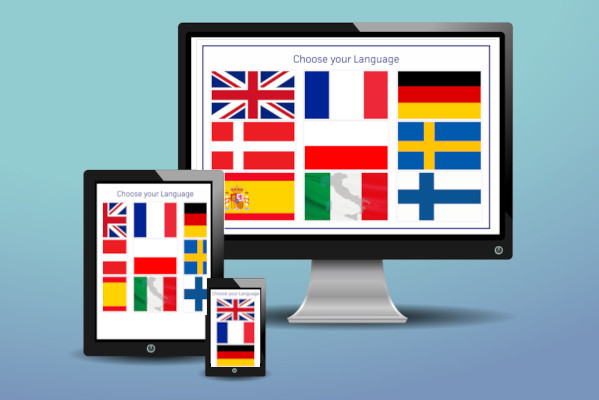
  • Multilingual: Checkout process can be completed in 9 different languages
  • Forgot to pay: You can charge one time fees for any given day
  • Unnecessary PCN's: Allowing your customers to pay at the event will ensure less PCN's are processed.
  • Satisfaction: An additional method of payment gives a better customer experience.
  • Payment Methods: Pay using a number of payment methods including contactless, credit/debit google and android pay.
  • Stripe Checkout: Stripe will process the checkout and ask the customer for their method of payment.
  • Successful Payment: Customer will be redirected to the thank you screen and emailed the receipt.Their vehicle will be processed on MyCarPass system.
  • Responsive: The kiosk will work on any touchscreen size, on any device connected to the internet.
Camera Dashboard

How The Kiosk Works

The quick process of paying for parking couldn't be simpler.

1
Choose a Language

Select a language from a selection of 9 different languages to choose from. Default is English.

2
Choose an Option

Register your vehicle, enter a vehicle hanger card, or select Purchase Car parking.

3
Choose a Parking Product

Click on an available parking product you would like to purchase.

4
Complete Parking

Fill in the simple form, Choose a method of payment and complete the payment process.

Easy Implementation

Get your ANPR camera management system up and running quickly with our streamlined implementation process.

1
Car Parks

Setup the Car Parks and Gates.

2
Setup

Create your events and products.

3
API

Setup the API Groups and test.

4
Monitor

Start receiving orders in real-time

Frequently Asked Questions

Common questions about the Event Module

You can add as many events and products as you like. There is no limit to this functionality.

When an order is created on the system, or via the API, we will process the order and send an email using the correct event template.

MyCarPass works in a Multi Tenancy environment, therefor your database and the data/assets within is separate from other clients. This makes it easy for us to migrate your data if you wish to do so, whilst keeping within any regulations.

Once your establishment is setup, you will have your own unique link which gives you access to your dashboard.

Not at all. We will attach to your account some documentation for the admin panel, Kiosk panel, Partner Dashboard for you to download and read. all our documentation has screenshots showing you exactly what to do.

No, our cameras are fully remote and have their own batteries and solar power, therefor can be erected in any remote locations, such as Fields, Parks, practically anywhere there is no electric.

Yes absolutely, we would not just leave you to setup everything. Our software engineers would would work closely with you to setup the system as much as we can.

For Staff and volunteers, there are a number of things you can do:
  1. Register an individual VRM to a whitelist for a given date range
  2. Batch upload a csv of vehicle registrations to a car park for a given date range
  3. Setup Car Park QR Codes, so that staff and volunteers can register their own Vehicle using the same code
  4. Setup Individual Hanger Cards and issue either digitally or physically at the event, which would require them to register their own vehicle.
As you can see there are a number of options depending on the quantity of staff/volunteers attending the event.

We can setup multiple car parks at your event and issue PCN to people who park in the wrong car park. For example, you may have a car park for Coaches, a separate car park for Staff/Volunteers, a separate car park for Cars only, or a separate restricted car park via a gate for participants (bands, actors, speakers, companies selling etc...).

No, the kiosk software is web based and runs on a unique URL to your system/database. You are free to use your own touchscreen system, tablet and stand, however if you choose to use your own hardware, the contactless feature may not work and would need slightly changing.

Yes it can. You can give a free number of car parking spaces based on a number of tickets ordered. For example at a ratio of 4/1, if 4 tickets was purchased and you wanted to give 1 free car parking pass, you can do so using our ticket to car park algorithm, which allows you to set a ratio against the ticket product.

Yes, you can setup and sell ticket products and car parking products using the event module.

Yes, we have a page builder which will allow you to customise the front end to your current art work on your existing website, therefor which makes MyCarPass looks and feels like a part of your business, from logos to colours, to specific fonts. For more complex designs our software developers can work with you.

Yes you can. You can add either ticket or parking products to your online shop and start selling immediately. We allow the customer to add their vehicle registration for parking products. Once the customer has successfully paid, the vehicles will be automatically added to the whitelist as it goes through a process.

Clients get their own white-label ecommerce shop to sell event tickets and parking products directly. You organize products into categories (tickets, parking, VIP packages, etc.), and customers shop like any online store. When they add a parking product to cart, they must verify their vehicle via DVLA lookup before checkout. Upon purchase completion, customers receive an invoice email plus a separate event confirmation email with parking permits and car park directions.

If the DVLA lookup fails to verify the registration number, the customer sees an on-screen message stating "Your vehicle is not recognised. Please check your registration number and try again." This prevents fake or invalid registrations from being added to parking products. The customer must enter a valid, DVLA-verified registration to proceed with checkout.

Yes! You can create unlimited product categories to organize your shop exactly how you want. Common categories include "Event Tickets," "Car Parking," "VIP Packages," "Merchandise," "Hospitality," or any custom categories that suit your event. This makes it easy for customers to find what they're looking for and helps you manage large product catalogs across multiple events.

The Event module accepts orders through API webhooks or CSV imports. For Secutix, we provide native integration with automatic field mapping algorithms. For other platforms like Eventbrite, Ticketmaster, or See Tickets, use our Custom API Builder to map your JSON fields to MyCarPass structure. Once configured, orders flow automatically from your ticketing system to My Car Pass without manual intervention.

You can export a list of all non-processed orders to CSV, then import into email marketing platforms like Mailchimp for reminder campaigns. You can also batch re-send registration invite emails to specific date ranges or order numbers directly from MyCarPass. The system tracks processed vs. unprocessed orders in real-time on your dashboard for easy monitoring.

Yes! Every order confirmation email includes an "Update My Vehicle" button. Customers can return anytime before the event to change their registered vehicles. The system automatically updates the whitelist and issues new parking permits. This is particularly useful for customers whose circumstances change or who need to swap vehicles last minute.

Hanger codes are physical passes displayed on windscreens for events requiring visible permits. Generate batches with sequential numbering (e.g., HANGER-001 to HANGER-100), then distribute via email with QR codes embedded. Recipients scan the QR code or enter the code online to register their vehicle. Once registered, the hanger code creates a whitelist entry. Perfect for VIP parking, media access, or contractor passes.

Get In Touch

Fields marked as * are mandatory.

Related Features

Cloud-Based Platform

Access your system anywhere, anytime with automatic updates, enterprise-grade security, and 99.9% uptime SLA guarantee.

Read More

Custom Permits Builder

Build custom permits using the MyCarPass Permit Builder. Add Sections, questions, multi choice, free text inputs, select boxes, file uploads.

Read More